


Thailand
Royal Island Tour
From $1499
Visit The
East Coast Shores
From $1799
Northern Italy
Shores and Cities
From $3299
Historical
Downtown London
From $1199
Visit The
Italian West Shores
From $2799
Relax In
The Virgin Islands
From $1999
Sightsee
In Lovely Paris
From $2599
Get Away
In Alberta Canada
From $2099
Visit Our Top Resorts
Floating Menu
- Details
- Created on Thursday, 12 December 2013 19:22
Features at a glance:
- Set a background image to the menu, gradient or solid color
- Set to snap or smooth scroll in
- Determine at which point as you scroll down your page that the menu drops in
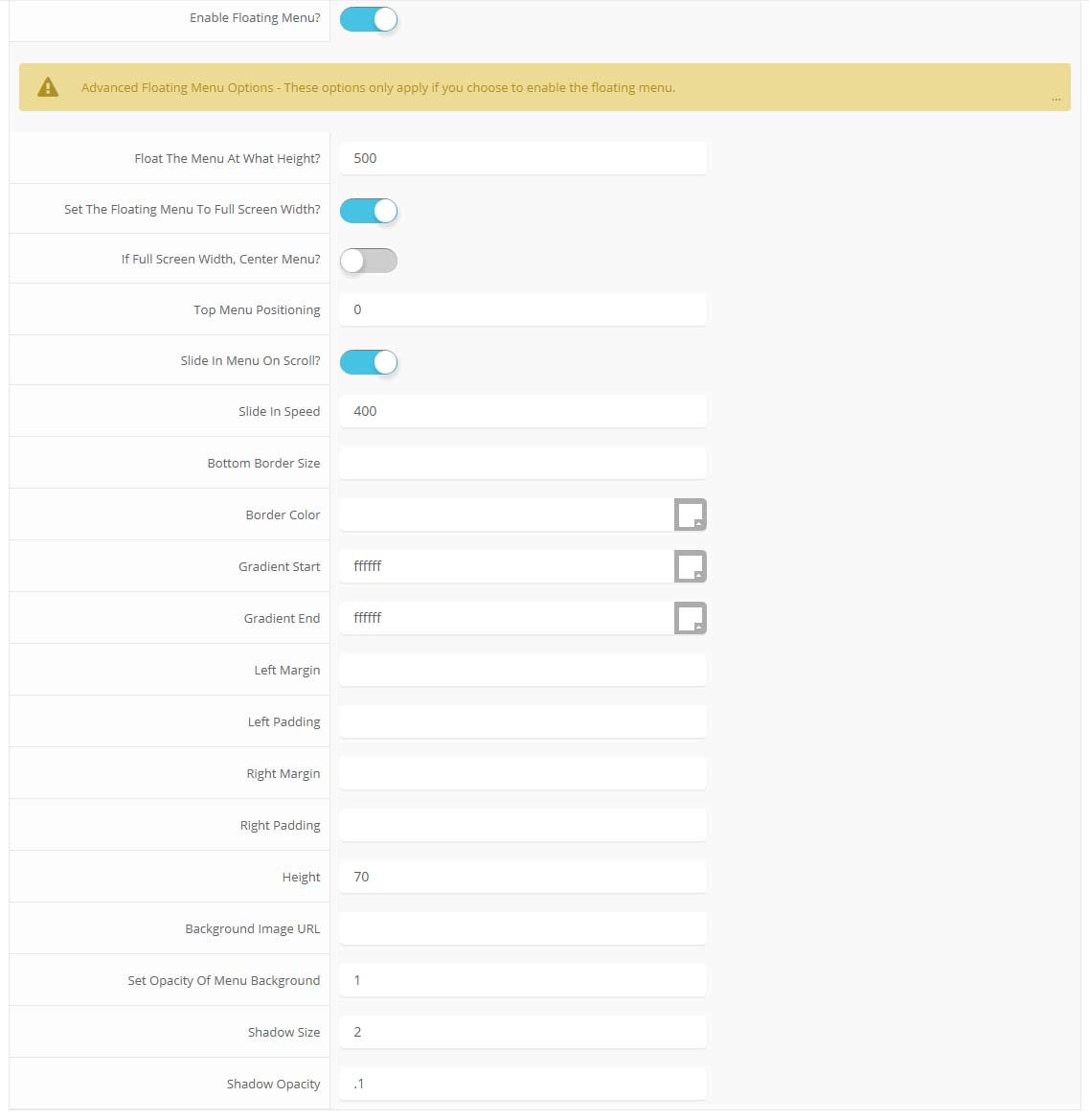
- and many more features, just check out the screenshot below
Admin area of the Floating Menu:
Parallax Backgrounds
- Details
- Created on Thursday, 12 December 2013 19:21
Features:
- Set the scroll speed of the images
- Set background repeat style
- Set background image size, 100%, cover, contain, etc
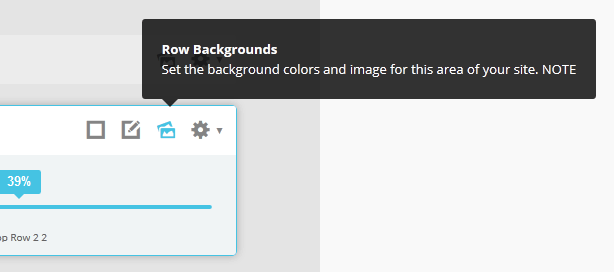
- Set custom backgrounds for all s5 rows in the framework.
- Enable or disable parallax on a per row basis
Admin Area Of The Backgrounds Tab:
Typography Options
- Details
- Created on Sunday, 12 May 2013 03:48
This is a sample blockquote. Use <blockquote><p>Your content goes here!</p></blockquote> to create a blockquote.
This is an image with the "boxed" class applied:

This is an image with the "boxed_black" class applied:
This is an image with the "padded" class applied:
This is an image with the "full_width" class applied. This can also be done automatically in the template configuration. Be sure to review our Vertex Guide here for other full width image options.

Heading 1
Heading 2
Heading 3
Heading 4
Heading 5
<a> With readon class applied:
readon
<span> With highlight1 class applied:
highlight1
<span> With highlight2 class applied:
highlight2
<span> With uppercase class applied:
uppercase
<a> With readon_highlight1 class applied:
readon_highlight1
<a> With readon_highlight2 class applied:
readon_highlight2
<a> With readon_border_highlight1 class applied:
readon_border_highlight1
<a> With readon_border_highlight2 class applied:
readon_border_highlight2
There is also a class readon_border_white that appears like the two classes above, but because of the white background here it would not be visilble. It used on the homepage inside of the S5 Image and Content Fader module.
<a> With large_readon_highlight1 class applied:
large_readon_highlight1
<a> With large_readon_highlight2 class applied:
large_readon_highlight2
<a> With large_readon_border_highlight1 class applied:
large_readon_border_highlight1
<a> With large_readon_border_highlight2 class applied:
large_readon_border_highlight2
There is also a class large_readon_border_white that appears like the two classes above, but because of the white background here it would not be visilble. It used on the homepage inside of the S5 Image and Content Fader module.
This is a customer quote box, you simply need to change out the text, image name, and the three hex colors in code shown below to ones of your choice:

We had the best vacation we have ever had
“Lorem ipsum dolor sit amet, consectetur adipiscing elit. Nullam molestie mi a nunc porta facilisis. Mauris varius volutpat interdum. In quis congue velit, sit amet.” // Matt and Trish Green<div class="s5_cust_quote_img_wrap">
<img style="border:solid 3px #2AB98E" src="images/customer_quote1.jpg" alt="" />
</div>
<div class="s5_custom_quote_text_wrap">
<div style="background:#2AB98E;border-bottom:solid 3px #3D8A73" class="s5_custom_quote_text">
<h4>We had the best vacation we have ever had</h4>
<span>“Lorem ipsum dolor sit amet, consectetur adipiscing elit. Nullam molestie mi a nunc porta facilisis. Mauris varius volutpat interdum. In quis congue velit, sit amet.”</span>
// Matt and Trish Green
</div>
</div>
<div style="clear:both"></div>
</div>
#s5_code { width: 30px; color: #fff; line-height: 45px; }
- This is an Ordered List
- Congue Quisque augue elit dolor nibh.
- Condimentum elte quis.
- Opsum dolor sit amet consectetuer.
- This is an Unordered List
- Congue Quisque augue elit dolor nibh.
- Condimentum elte quis.
- Opsum dolor sit amet consectetuer.
- This is an Unordered List with class plus
- Congue Quisque augue elit dolor nibh.
- Condimentum elte quis.
- Opsum dolor sit amet consectetuer.
- This is an Unordered List with class ul_arrow
- Congue Quisque augue elit dolor nibh.
- Condimentum elte quis.
- Opsum dolor sit amet consectetuer.
- This is an Unordered List with class ul_star
- Congue Quisque augue elit dolor nibh.
- Condimentum elte quis.
- Opsum dolor sit amet consectetuer.
- This is an Unordered List with class ul_bullet
- Congue Quisque augue elit dolor nibh.
- Condimentum elte quis.
- Opsum dolor sit amet consectetuer.
The following list will support lists up to number 9, add the following class to the UL wrapping the below LI elements, class="ul_numbers":
- This is a sample styled number list <li class="li_number1">Your content goes here!</li>
- This is a sample styled number list <li class="li_number2">Your content goes here!</li>
- This is a sample styled number list <li class="li_number3">Your content goes here!</li>
- This is a sample styled number list <li class="li_number4">Your content goes here!</li>
<div class="s5_pricetable_3">
<div class="s5_pricetable_column">
<div class="s5_pricetable_column_padding">
<div class="s5_title">Basic</div>
<span class="dollarsign">$</span><span class="price">49</span><span class="month">/per month</span>
<div class="s5_options">
Unlimited Space & Traffic<br>
99.9% Server Uptime<br>
24/7 Customer Care<br>
30 Days Money Back<br><br>
</div>
<div class="s5_horizontalrule"></div>
<div class="s5_buttoncenter"><a class="button s5_pricetable" href="#">Choose</a></div>
</div>
</div>
<div class="s5_pricetable_column recommended">
<div class="s5_pricetable_column_padding">
<div class="s5_title">Standard</div>
<span class="dollarsign">$</span><span class="price">79</span><span class="month">/per month</span>
<div class="s5_options">
Unlimited Space & Traffic<br>
99.9% Server Uptime<br>
24/7 Customer Care<br>
30 Days Money Back<br>
FREE Domain Name<br>
Personal Concierge
</div>
<div class="s5_horizontalrule"></div>
<div class="s5_buttoncenter"><a class="button s5_pricetable" href="#">Choose</a></div>
</div>
</div>
<div class="s5_pricetable_column">
<div class="s5_pricetable_column_padding">
<div class="s5_title">Premium</div>
<span class="dollarsign">$</span><span class="price">99</span><span class="month">/per month</span>
<div class="s5_options">
Unlimited Space & Traffic <br>
99.9% Server Uptime<br>
24/7 Customer Care<br>
30 Days Money Back<br>
FREE Domain Name
</div>
<div class="s5_horizontalrule"></div>
<div class="s5_buttoncenter"><a class="button s5_pricetable" href="#">Choose</a></div>
</div>
</div>
<div style="clear:both;"></div>
</div>
Make any Youtube, Vimeo, etc video you embed to your site work with responsive by wrapping with a DIV with a class of "s5_video_container". The below Youtube Video will shrink when the area its contained in gets too small for it:
Tool Tips
- Details
- Created on Sunday, 12 May 2013 03:47
Demo 1:

Demo 2:
Demo 2 Image Tool Tip
Demo 3:
Demo 3 Image Tool Tip
The Template's Settings
- Details
- Created on Sunday, 12 May 2013 03:47
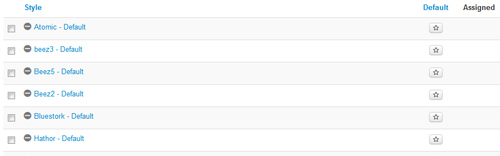
This template comes loaded with options that you can use to customize your site exactly how you want it. Here's how to get to these custom settings:
- In the backend of Joomla go menu item Extensions/Template Manager.
- Click on the title of the template.
- This will bring you to the template manager screen where you can edit the template's parameters.
- Click save when you are done
Template Specific Options
- Details
- Created on Sunday, 12 May 2013 03:46
Every template built on Vertex also comes with its own unique template specific options applicable to that particular template such as highlight colors, social icons, and much more. These features are in addition to the standard functions of Vertex, and are still controlled through the very user friendly interface of Vertex. This page will document the features specific to this template.
Template Specific Configuration Interface of Vertex
Below is a screenshot that shows all the template specific features available in the user friendly Vertex admin:
Custom Highlight Colors
One of the first things you will notice about Oasis is the vibrant colors found throughout the design, this is all made possible by the very wide variety of color configuration options shown in the screenshot above. In addition to that you can also change the color of any module row under the Backgrounds tab within Vertex. Below is an example of how these color choices work.
The colors choices you can pick from the Vertex admin are:
1. Change the background color of any module row under the Backgrounds tab.
2. Change the background color of the custom_2 row.
3. Set a background color to show behind the menu when custom_1 is not present (see below for more information).
4. Two highlight colors control buttons, titles, links and more.
5. Set the login and register link colors that show in the upper right corner.
6. Choice a background color for the S5 Box (login and register popup).
7. Set the active and inactive colors of the S5 Tab Show tabs.
Header Background Image and Color
Whenever the custom_1 position is used it will show undernearth the menu and logo area. The logo menu and logo area is opaque so the image in custom_1 will show through. Whenever there is not a module published to custom_1 the header area needs its own background color or image since it no longer has a module showing through from underneath it. You can easily set a solid color or a background image for when custom_1 is not present.

Social Icons
Easily link to a social media site with the built in social icons found in the header of this template. Simply enter the url of your social site in the configuration and the icon will automatically appear. To disable an icon simply leave the url blank for that particular icon.
Uppercase Leters
Choose to enable or disable uppercase letters on most menu items, buttons, titles and more.

Small Menu
The S5 Flex Menu gives you the ability to have subtext on each menu item. If you choose not to use subtext on the first level links simply choose to disable this option and the menu will automatically down size.

We had the best vacation we have ever had
“Lorem ipsum dolor sit amet, consectetur adipiscing elit. Nullam molestie mi a nunc porta facilisis. Mauris varius volutpat interdum. In quis congue velit, sit amet.” // Matt and Trish Green
The booking process was relaxed and easy
“Duis accumsan dignissim leo, eu facilisis sem aliquet eleifend. Duis viverra interdum est. Cras ut rhoncus sapien. Sed volutpat quis mauris nec sodales donec orci tellus” // Chris and Emily MeyersFind Deals On Cruises

Book The Perfect Cruise
Lorem ipsum dolor sit amet, consectetur adipiscing elit. Nullam molestie mi a nunc porta facilisis. Mauris varius volutpat interdum. In quis congue velit, orci, egestas in egestas eu, lacinia id sem.Cheap Air Line Tickets

Discount Airline Tickets
Ut non massa quis sapien ullamcorper posuere. Fusce vel lorem non ligula pellentesque elementum vel ut lacus. Nam ligula urna, vestibulum non odio id, sollicitudin tempus est. Fusce imperdiet vel.Fun Recreational Activities

Find Things To Do
Sed pretium metus condimentum, adipiscing elit placerat, tempor ligula. Curabitur accumsan turpis dui, vitae rhoncus quam bibendum ac. Aenean dignissim urna nisi, eu porttitor mauris tristique eu.Budget Car Rental Sales
Nice Cars On Budget
Lorem ipsum dolor sit amet, consectetur adipiscing elit. Nullam molestie mi a nunc porta facilisis. Mauris varius volutpat interdum. In quis congue velit, orci, egestas in egestas eu, lacinia id sem.Quiet Beaches Of The World
Little Known Beaches
Sed pretium metus condimentum, adipiscing elit placerat, tempor ligula. Curabitur accumsan turpis dui, vitae rhoncus quam bibendum ac. Aenean dignissim urna nisi, eu porttitor mauris tristique eu.


